SSH
You may need more than Jupyter notebook. In this case, there is ssh access to a machine. If you did not hear about it before, just read carefully. Below, there are described two OS and ways how to connect..
TIP
Your username is the same as the UHK network, but your password is different. Alisa is not connected to you UHK account!
Linux & OSX
Is your operation system UNIX based? It is very simple! Just use ssh command.
shell
ssh YOUR-USER-NAME@alisa.uhk.cz
Windows
Oh, ok. There are a few more steps to connect. But first... OS of Alisa is Ubuntu (LTS), so there is no way to connect as you know from the remote desktop!
Microsoft is working on something for you. So... follow the news.
There are some alternatives but I have tried them. Cannot give you a warranty for working.
WinSCP + putty
There is a way to work with the tested solution. I would recommend it to you. I would recommend it to you.
WinSCP
Install WinSCP from official website. You may know or have WinSCP from access to the secured network. WinSCP UHK guide
putty
The second needed SW is PuTTY. You can download it from PuTTY website.
How to connect...
Open WinSCP and add a new connection to Alisa.
WinSCP login
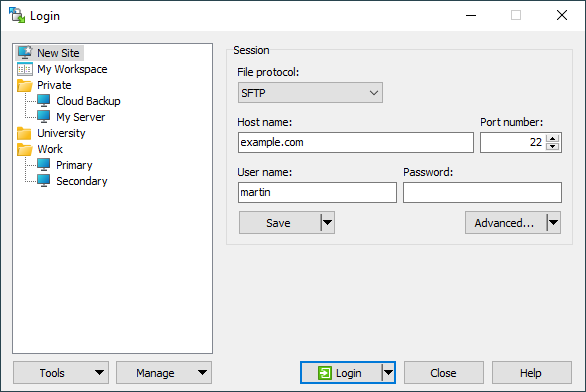
host: alisa.uhk.cz
port: 22
user: your user name
pass: your super-secret password to Alisa
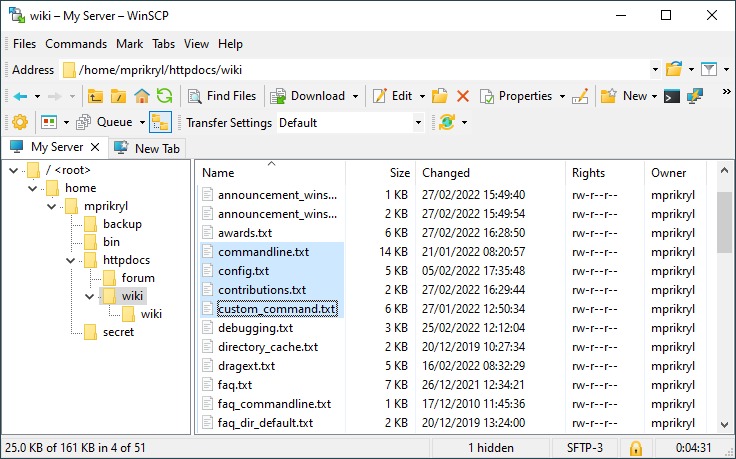
WinSCP explorer window after successfull login
WinSCP open in putty
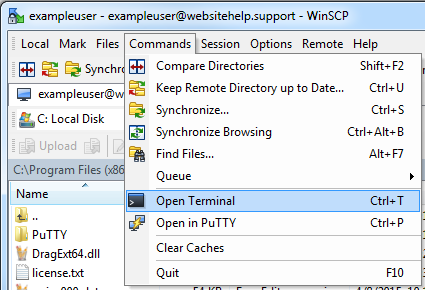
In PuTTY you will get the connected same way as with UNIX ssh command.